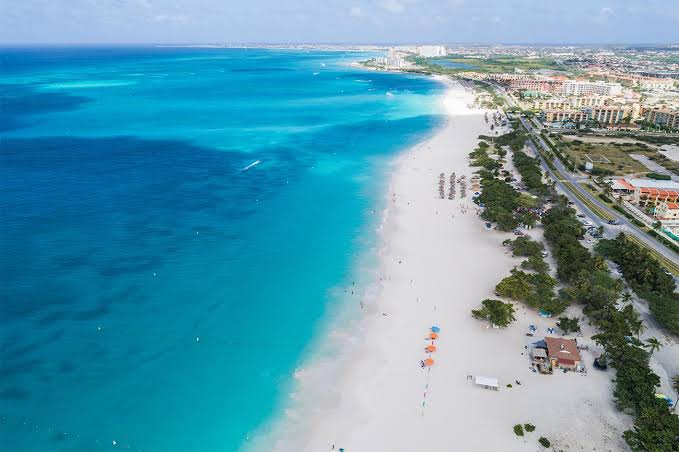
Stay connected effortlessly during your Aruba trip with NexaEsim's travel eSIMs. This comprehensive guide covers everything from choosing the right plan and ensuring device compatibility to seamless activation and expert troubleshooting.
Quick Answer
The best way to ensure seamless connectivity for your Aruba trip in 2026 is by pre-activating a NexaEsim plan. This allows you to bypass airport queues and get online the moment you land at Queen Beatrix International Airport (AUA). NexaEsim offers a diverse range of data plans, from short-term options suitable for light users to extensive 30-day unlimited data plans ideal for digital nomads or families. Always confirm your device's eSIM compatibility and complete the activation process before your departure for a stress-free arrival in Aruba.
Why Choose an eSIM for Your Aruba Trip?
An eSIM from NexaEsim revolutionizes your travel connectivity by eliminating common hassles and providing immediate access to mobile data. Here’s why it’s the smart choice for your journey to Aruba:
- Skip Airport Queues: Activate your eSIM online before you even board your flight, avoiding the need to wait in line at physical SIM card kiosks upon arrival at AUA.
- Instant Connectivity: Be connected the moment your plane touches down. Access maps, book ride-shares, or send urgent messages without any delay.
- Flexible Plans: NexaEsim provides a wide array of data plans, including options for 1GB, 7-day, 10GB, 15-day, and 30-day unlimited data, allowing you to select the perfect fit for your trip duration and data consumption needs.
- Easy Top-ups: Should you need more data during your stay, topping up your plan is straightforward and can be done directly from your NexaEsim account, no local store visit required.
- Invoiceable Receipts: Business travelers, digital nomads, and students can easily download detailed invoices for expense reporting or reimbursement, simplifying financial administration.
- Device-Friendly Setup: Benefit from clear, step-by-step activation guides tailored for popular devices like iPhone, Samsung Galaxy, and Google Pixel.
- Reliable Support: Access 24/7 online support and comprehensive troubleshooting guides to quickly resolve any connectivity issues you might encounter.
Aruba's Mobile Network Coverage & Internet Experience
Aruba boasts generally reliable mobile data connectivity, particularly within its main urban and tourist centers. NexaEsim partners with leading local networks, typically including Setar and Digicel, ensuring robust coverage across the island.
Where to Expect the Best Signal
- Strongest Coverage: Anticipate consistent 4G/LTE service and potential 5G availability in popular areas such as Oranjestad, Palm Beach, Eagle Beach, major resort zones, and at Queen Beatrix International Airport (AUA).
- Variable Coverage: Connectivity may be less consistent in more secluded beaches, remote inland areas, or inside certain hotel structures.
- 4G vs. 5G: While 4G/LTE provides ample speed for most travel needs, 5G is emerging in some urban centers. Its availability and performance can vary based on your exact location, the local operator's network deployment, and your device's capabilities.
Verifying Coverage & Weather Impact
For critical connectivity requirements, it's wise to:
- Consult the official coverage maps of local carriers (e.g., Setar, Digicel) for the specific regions you plan to visit.
- Review recent, date-stamped third-party speed-test reports for Aruba to set realistic expectations.
- If guaranteed indoor coverage at a specific hotel or campus is essential, contact them directly for confirmation.
Aruba enjoys a consistently warm, tropical climate year-round. During peak tourist seasons (typically the northern-hemisphere winter months), network demand in popular areas can increase, which might occasionally affect data speeds. Plan your data usage accordingly, especially if you anticipate heavy streaming or remote work during these busy periods.
Visa and Entry Requirements
Before traveling to Aruba, always verify the latest visa and entry requirements with official government sources or your country's embassy. Requirements can change, and it's essential to have up-to-date information for a smooth entry.
eSIM vs. Physical SIM: Which is Best for Aruba?
Deciding between an eSIM and a traditional physical SIM card can significantly impact your arrival experience. Here’s a comparison to help you choose:
| Feature | Buying a Physical SIM at Aruba Airport (AUA) | Pre-activating NexaEsim Online Before Departure |
|---|---|---|
| Time to Get Connected | Can involve queues, local ID/registration, and manual setup on arrival (15-45 min). | Fastest option: Pre-activate and test before travel. Online provisioning is often instant, allowing you to be online on landing. |
| Plan Selection & Pricing | Limited options; airport stock and prices may vary. | Full plan catalog, frequent deals, and transparent pricing. |
| Support | In-person help available, but language and staffing can vary. | 24/7 online support, live chat, and clear refund/top-up processes. |
| Device Compatibility | Works for any phone with a physical SIM tray; may require ID. | Requires an eSIM-capable, unlocked device (most modern iPhones, Samsung, Pixel models); check device guides. |
| Receipts & Expense Reporting | Receipt availability varies by kiosk; often paper-only. | Downloadable, invoiceable receipts available via your NexaEsim account for expense claims. |
| Convenience for Dual-SIM | Possible, but uses a physical slot. | Easier: Keep your home SIM active and add the Aruba eSIM as a secondary line for data. |
| Best For | Travelers who prefer physical SIMs, have non-eSIM phones, or need a local physical number immediately. | Most tourists, business travelers, digital nomads, and students who want to skip queues and be online on arrival. |
Choosing Your NexaEsim Plan for Aruba
NexaEsim offers a variety of plans tailored to different traveler types and data needs. Consider your trip length and anticipated data usage when making your selection.
NexaEsim Aruba Plans at a Glance
Here’s a selection of popular NexaEsim plans for Aruba, offering a balance of duration, data, and value:
| Plan Duration | Data Included | Approximate Price (USD) | Best For | User Experience & Advice |
|---|---|---|---|---|
| 1 Day | Unlimited | $9.18 | Short layovers, urgent meetings | Quick, essential connectivity. Ideal for brief stops or critical tasks. |
| 3 Days | Unlimited | $25.31 | Weekend trips, short business visits | Reliable data for navigation, messaging, and light browsing. |
| 5 Days | Unlimited | $41.44 | Extended weekends, short vacations | Ample data for social media, maps, and some streaming. |
| 7 Days | 1 GB | $7.93 | Minimal users, emergency backup | Very light use only. Combine with Wi-Fi where possible. |
| 7 Days | Unlimited | $57.57 | Standard vacations, moderate users | Worry-free browsing, social media, and video calls. |
| 10 Days | Unlimited | $81.77 | Longer vacations, family trips | Great for shared use or heavier individual data needs. |
| 15 Days | 2 GB | $13.93 | Budget travelers, Wi-Fi reliant users | Strictly for essential communication. Top-up likely needed. |
| 15 Days | Unlimited | $122.09 | Extended stays, heavy users | Ideal for sustained connectivity, remote work, and streaming. |
| 30 Days | 3 GB | $19.04 | Students, long-term light users | Cost-effective for basic needs, especially when combined with local Wi-Fi. |
Note: Prices are approximate and subject to change. Unlimited Plus plans are also available for even higher data priority. Always check the NexaEsim website for the most current pricing and plan details.
Estimating Your Data Needs
To help you choose, consider these typical data consumption rates:
- Maps/Navigation: ~0.05–0.3 GB per day
- Messaging (WhatsApp, iMessage): Minimal (MBs per day)
- Social Media & Photo Uploads: ~0.2–1 GB per day (more with frequent video uploads)
- Standard Video Streaming (per hour): ~0.5–2 GB
- High-Quality Video Streaming (per hour): 2+ GB (use Wi-Fi for long sessions)
- Video Calls (standard resolution per hour): ~200–600 MB
- Hotspot/Tethering: Varies significantly by connected device activity; can consume data rapidly.
Fair-Use Policy for Unlimited Plans
NexaEsim's "unlimited" data plans are subject to a fair-use policy. While designed for heavy users, continuous excessive tethering or abnormal sustained usage may trigger speed management. Always refer to the specific fair-use terms on the product page before purchase.
How to Buy and Activate Your NexaEsim in Minutes
Purchasing and pre-activating your Aruba eSIM is a quick and straightforward process:
- Select Your Plan: Visit the NexaEsim Aruba product page and choose the plan duration and data bucket that best suits your trip.
- Confirm Device Compatibility: Use the device check tool on the product page to ensure your phone supports eSIM technology and is carrier-unlocked.
- Complete Secure Payment: Create or sign in to your NexaEsim account and finalize your secure online payment.
- Receive Provisioning Instructions: You will immediately receive a QR code or in-app provisioning instructions via email.
- Install eSIM Profile: Follow the provided on-screen prompts or device-specific guides to install the eSIM profile onto your phone.
- Choose Activation Time: Select "pre-activate" to have your eSIM ready to enable on landing, or "start-on-arrival" if you prefer to activate the plan after you land in Aruba.
Device Compatibility Checklist
Before purchasing, ensure your device meets these requirements:
- eSIM Capable: Most modern iPhones (XS and newer), Google Pixel (3a and newer), and Samsung Galaxy (S20 and newer) models support eSIM.
- Carrier-Unlocked: Your phone must be unlocked to use international eSIMs.
- Updated OS: Ensure your device runs the latest iOS or Android version for the smoothest eSIM experience.
- Dual-SIM Settings: If you plan to keep your home number active, understand how to manage dual-SIM settings.
Activation Micro-Guides (High-Level)
iPhone (iOS)
- Go to Settings > Cellular > Add Cellular Plan.
- Scan the QR code provided by NexaEsim or use the Nexa app for in-app provisioning.
- Label the new cellular line (e.g., "Nexa Aruba") and choose its role for data.
- Enable Data Roaming for the eSIM profile in Settings > Cellular > Data Roaming.
Android (Generic)
- Go to Settings > Network & Internet > SIMs or Mobile Network.
- Select Add eSIM or Add carrier.
- Scan the QR code or use the manual entry option (SM-DP+ activation token) if provided.
- Enable Data Roaming for the eSIM profile and set it as your preferred data SIM.
Note: OEM menus vary. For Samsung Galaxy, navigate to Settings > Connections > SIM card manager > Add mobile plan. For Google Pixel, navigate to Settings > Network & internet > Add carrier / Add eSIM.
Pre-activate vs. Start-on-Arrival
- Pre-activate (Recommended): Install the eSIM profile before you fly and set it to activate at your chosen local time or immediately on landing. This ensures you're online as soon as you arrive, ideal for late-night arrivals or busy immigration periods.
- Start-on-Arrival: Buy the eSIM before travel and install the profile, but choose to activate the plan only when you land. This preserves plan days if your travel dates are uncertain or you prefer to keep your home SIM active during the flight.
Aruba Arrival Checklist (Queen Beatrix International Airport - AUA)
Follow these steps within the first 60 seconds of landing:
- Before Landing: Confirm your scheduled activation time in your NexaEsim account (if you set one).
- On Arrival: Disable airplane mode. Select your eSIM as the cellular line for data and enable mobile data. Ensure Data Roaming is ON for the eSIM profile.
- Quick Test: Open maps and load a simple webpage to confirm connectivity.
- If No Service: Try toggling airplane mode off/on, restarting your phone, or performing a manual network selection (Settings > Mobile Network > Network Operators > Search Networks).
Common Mistakes to Avoid
- Not Checking Device Compatibility: Always run a device check first.
- Activating Too Early: If you want local rates or to preserve plan days, use the scheduled start time.
- Not Setting eSIM as Data Line: On dual-SIM devices, ensure the NexaEsim is selected for cellular data.
- Losing QR Code/Order Info: Keep a screenshot of your QR code and order ID for easy re-installation or support.
Managing Your Data: Top-ups, Extensions & Receipts
NexaEsim makes managing your data plan simple and convenient:
- Mid-Trip Top-ups: If your data runs low, you can easily top up your plan directly from your NexaEsim account dashboard. Top-ups typically provision quickly, often instantly or within minutes.
- Plan Extensions: For longer stays, you can extend your plan duration or choose a larger data bucket.
- Invoiceable Receipts: Download detailed receipts and invoices from your NexaEsim account after purchase. These are essential for business travelers, digital nomads, and students needing reimbursement.
Troubleshooting Common eSIM Issues
If you encounter connectivity issues, try these quick fixes:
| Symptom | 30-Second Quick Fix | Deeper Step / When to Contact Support |
|---|---|---|
| No service after activation | Toggle airplane mode; ensure eSIM is selected for data. | Manually select a local network, restart phone, or contact NexaEsim support with your purchase ID and screenshots. |
| Cellular data not working | Confirm mobile data is on and eSIM is assigned as data line. Ensure Data Roaming is enabled for the eSIM. | Check APN settings (usually auto-configured, but verify if needed) or reinstall the eSIM using the QR code; open a support ticket if the problem persists. |
| QR code won’t scan / Activation failed | Enter activation code manually via the app or settings. Ensure you have a stable Wi-Fi connection during installation. | Use the NexaEsim in-app provisioning or contact support with your order reference and device model. |
| Slow or unstable data | Move outdoors or to a different area; check for local congestion. | Report locations, timestamps, and screenshots to support if the issue is persistent. Try lowering video resolution for calls/streaming. |
| Top-up not applied | Check order confirmation; wait a few minutes and reconnect. | Contact support with your order ID and screenshots of your account. |
Copy-Ready Support Template:
When contacting NexaEsim support, include the following details for a faster resolution:
Subject: Aruba eSIM Activation/Data Issue — Order #[your order ID]
Body:
Order ID: [your order ID]
Device model: [e.g., iPhone 15 Pro Max, Samsung Galaxy S24, Google Pixel 8]
OS & version: [e.g., iOS 17.5, Android 14]
Problem: [brief description, e.g., "No service after activation", "Cellular data not working"]
Activation time (local): [timestamp of activation attempt]
Activation method: [QR/app/manual]
Steps tried: [list all steps, e.g., "toggled airplane mode, restarted phone, confirmed eSIM as data line, manual network selection"]
Screenshot(s) attached: Y/N
Please advise next steps.
Aruba eSIM for Specific Traveler Needs
For Families on Vacation
Keep the entire family connected with NexaEsim. Pre-activate profiles on each device to save valuable time at AUA. When planning data, estimate per-person daily usage and add a 20-30% buffer. Consider whether a single hotspot device or individual eSIMs are better for your family's needs.
For Business Travelers
NexaEsim helps business travelers stay productive and connected:
- Invoiceable Receipts: Easily download invoices for corporate reimbursement.
- Flexible Durations: Choose plans from 1-day for urgent meetings to 30-day for extended assignments.
- Data Sizing for Business: Email and maps use minimal data. Video calls (standard resolution) require 200-600 MB/hour. Hotspotting for presentations or large file transfers will consume data quickly, so opt for higher-data plans.
For Digital Nomads & Long Stays
NexaEsim supports your remote work lifestyle in Aruba:
- Long-Term Plans: Options from 15-day to 30-day unlimited (fair-use applies) with easy remote top-ups.
- Multi-Device & Hotspot: Tethering is generally allowed, but for heavy video conferencing or sharing with multiple devices, opt for larger plans.
- Remote Work Troubleshooting: For slow video/latency, try lowering resolution, using a wired headset, or moving to stronger signal areas.
For Students Studying Abroad
Stay connected throughout your semester in Aruba:
- Semester-Ready Validity: NexaEsim plans are built for long stays, with multi-month top-up options.
- University Reimbursement: Download invoiceable receipts for expense claims.
- Data Budgeting: Combine campus Wi-Fi for heavy tasks (lectures, software updates) with mobile data for maps, commuting, and essential communication.
Device-Specific Activation Tips
iPhone (iOS)
NexaEsim Aruba eSIMs are compatible with iPhone XS and newer models, including the latest iPhone 15 Pro Max. After scanning the QR code, label your plan (e.g., "Nexa Aruba") and set it as your cellular data line. For dual-SIM users, you can keep your home physical SIM for calls/SMS and use the eSIM for data. Remember to enable Data Roaming for the eSIM profile.
Google Pixel
Most modern Google Pixel models (Pixel 3a and newer) support NexaEsim Aruba eSIMs. Activation involves navigating to Settings > Network & internet > SIMs > Add carrier / Add eSIM. Scan the QR or use manual entry. Pixel devices handle dual-SIM well, allowing you to keep your home SIM for calls while using the eSIM for data. Verify APN settings if data doesn't work immediately.
Samsung Galaxy S24
NexaEsim Aruba eSIMs work on Samsung Galaxy S20 and newer devices, including the S24, provided they are unlocked. Activation is via Settings > Connections > SIM card manager > Add mobile plan. Scan the QR or use manual entry. Samsung's One UI allows easy management of dual-SIM settings, letting you choose default data and voice lines.
Frequently Asked Questions (FAQ)
What is the best eSIM for Aruba travel in 2026?
The best eSIM for Aruba travel is a pre-activated NexaEsim plan, offering instant connectivity on arrival, flexible data options (from 1GB to 30-day unlimited), and easy management for various traveler needs (tourists, families, business, digital nomads, students).
How much mobile data do I need for a 7-day Aruba vacation?
For light use (navigation, messaging, some photos), a 5-10 GB plan usually suffices. For moderate use (frequent social uploads, some streaming), consider 10-15 GB. Heavy users (daily streaming, video calls, hotspotting) should opt for larger plans or plan to top up.
Can I pre-activate my NexaEsim for Aruba before I land?
Yes, pre-activating your NexaEsim before departure is highly recommended. This allows you to install the profile and be ready to enable it immediately upon landing, saving time and avoiding airport queues.
Will my iPhone, Samsung, or Google Pixel work with an Aruba eSIM?
Most modern, unlocked iPhone (XS and newer), Samsung Galaxy (S20 and newer), and Google Pixel (3a and newer) models support eSIM. Always check your specific device model and ensure it's carrier-unlocked before purchase.
Does NexaEsim allow top-ups or plan extensions mid-trip?
Yes, NexaEsim supports easy top-ups and plan extensions directly from your account dashboard. It's recommended to top up before your data runs out to maintain continuous connectivity.
Can I use my Aruba eSIM for hotspot/tethering?
Tethering is generally supported but is subject to NexaEsim's fair-use policy. For heavy or prolonged hotspot use, especially for multiple devices or video conferencing, consider a larger data plan.
How do I get an invoice for business expenses or university reimbursement?
NexaEsim provides downloadable invoiceable receipts from your account dashboard immediately after purchase. These include all necessary details for expense reporting.
What if my Aruba eSIM shows "no service" after activation?
First, try the 60-second checklist: toggle airplane mode, restart your device, ensure the eSIM is selected for data, and enable data roaming. If issues persist, contact NexaEsim support with your order ID and device details using the provided support template.
Is there 5G coverage in Aruba, and will my eSIM use it?
5G availability in Aruba varies by location and local carrier deployment. If your device supports 5G and you are in an area with 5G coverage, your eSIM can utilize it. Expect the best 5G connectivity in major urban and resort areas.
Should I buy an eSIM at Aruba airport or online before travel?
For most travelers, buying a NexaEsim online before travel is recommended. It saves time, offers a wider range of plans, and ensures you're online immediately on arrival. Buying at the airport is a fallback if your device doesn't support eSIM or you need in-person assistance.
How much data will I need per month as a student in Aruba?
For students, data needs vary. Light users might need 5-15 GB/month (email, messaging, light maps). Average users (streaming lectures, weekly video calls) might need 20-50 GB/month. Heavy users (daily video calls, tethering) could need 50+ GB/month. Combining with campus Wi-Fi can significantly reduce mobile data consumption.
Ready for Seamless Connectivity in Aruba?
Skip the airport queues and ensure you're online the moment you land. Choose the best NexaEsim plan for your Aruba travel needs, pre-activate before you fly, and enjoy reliable connectivity throughout your trip.
Buy Your Aruba eSIM Now & Get Online on Arrival!



